The Shopify migration mistakes that cost you organic traffic
Jump to a section 9 sections
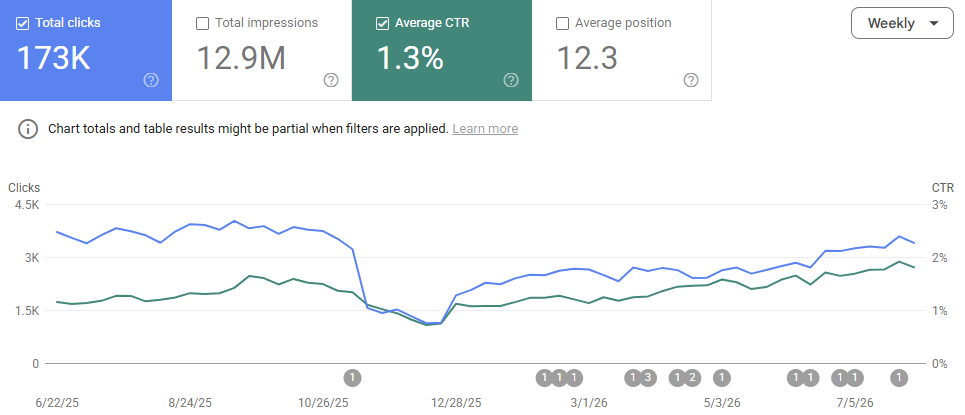
Almost every migration I get called into after the event has lost traffic for one of about six reasons. None of them are exotic. None of them are Shopify's fault. And nearly all of them were decided weeks before anyone pushed the site live, by people who had no idea they were making an SEO decision at the time.
That's the thing worth understanding about migrations. The damage doesn't happen at launch. It happens in a planning meeting where somebody says "while we're here, let's tidy up the category structure", and everyone nods, because it's a sensible thing to say.
Here are the ones that come up again and again.
1. Redirects written after launch instead of before
This is the big one, and it's the one that turns a dip into a drop.
The pattern is always the same. The build runs long, launch week arrives, redirects are on somebody's list but not at the top of it, and the site goes live with the intention of sorting them out in the next sprint. By the time anyone does, Google has already recrawled a few thousand URLs, found 404s, and started dropping them.
Redirects aren't a post-launch task. They're a pre-launch deliverable, and the mapping file should exist and be signed off before the go-live date is even confirmed. If your build team can't tell you where a given old URL will point on the new site, you're not ready to launch.
2. Changing the URL structure without mapping it
Some URL change is unavoidable on Shopify. Products live under /products/, collections under /collections/, blog posts under /blogs/. Unless you're going headless, you don't get to keep a path like /womens/knitwear/aran-jumper, and there's no point fighting it.
The mistake isn't the change. It's treating the change as unmapped. Every URL that earned a click in the last twelve months needs a destination, and "the homepage" isn't a destination. A redirect to somewhere irrelevant is treated as a soft 404, which means you've done the work and got none of the benefit.
3. Taking a forced URL change as licence to redesign the architecture
This one is subtler and does more damage than people expect.
Because the URLs have to change anyway, it starts to feel free to rethink everything else at the same time. Merge those two thin collections. Flatten that category tree, it's three levels deep and nobody uses it. Drop the sub-collections and use filters instead.
Each of those might be a good call on its own. Taken together, in the same release as a platform change, you've altered the structure, the internal linking and the URLs all at once, and when traffic moves you'll have no way of telling which decision caused it.
Your site architecture and internal linking are ranking signals in their own right. Rebuild the structure you had inside Shopify's constraints first, launch, let it settle, then improve it deliberately with something to measure against.
4. Dropping content nobody could see the value of
Blog archives are the usual casualty. Somebody looks at four hundred posts going back to 2014, sees that most of them get no traffic, and decides they're not worth migrating.
Usually they're right about most of them. The problem is the handful that aren't. In a long archive it's normal for a small number of old posts to be carrying real traffic and a good chunk of the site's links, and you can't tell which ones by looking at the list. You have to check.
The same applies to old category pages, buying guides, size guides and anything else that accumulated over a decade without anyone noticing. Pull the data before deciding, not after.
5. Leaving the staging site indexable
A small mistake with an outsized effect. A staging build gets indexed, Google sees two copies of the store, and either the wrong one ranks or both get treated as duplicates.
Shopify makes this easy to get wrong, because password-protecting a development store is the obvious control and it isn't always the one that gets used. Whatever the setup, the check is quick: search for your staging domain before launch, and again a week after, and make sure the live site is the only one Google can reach.
6. Assuming somebody is handling SEO
The one that underpins all of the above.
Migrations are run by design and build teams, and they're good at design and build. Nobody on the project is being obstructive. It's just that "protect the organic revenue" isn't in anyone's statement of work, so it becomes the thing everyone assumes is covered by somebody else.
If you can't name the person who owns search on your migration, it isn't owned.
What good looks like instead
The process I run on a migration isn't complicated, and most of it happens before anyone writes any code.
Before the build. A full crawl of the existing site plus twelve months of Search Console data, so there's an agreed list of which URLs actually earn traffic and revenue. That list becomes the thing the migration has to protect, and it settles arguments later, because "should we keep this page?" stops being a matter of taste.
During. URL mapping and redirect rules while the structure is still being decided rather than after it's locked. Template-level SEO on the new theme, structured data, internal linking, and a check that the content genuinely made it across rather than appearing to.
Launch week. A crawl of staging before you go live, a crawl of the live site straight after, indexing requests on the pages that matter, and monitoring tight enough to catch a problem in days instead of at the end of the quarter.
After. Tracking recovery against the pre-migration baseline. This is the step that gets skipped most often, and it's the one that tells you whether any of the rest worked. Without a baseline you're left arguing about whether traffic is down, which is not a useful conversation to have three months after launch.
If it's already gone wrong
Plenty of the migration work I do is after the fact, and it's a different job.
Recovery starts with rebuilding the record nobody kept: what the old URLs were, and which of them mattered. The Wayback Machine, whatever Search Console still holds, and any surviving crawl data will usually get you most of the way there. From that you can work out what was lost, redirect what's worth saving, rebuild the pages that shouldn't have been dropped, and get the important templates crawled again.
It takes longer than doing it properly first time, and the traffic doesn't come back overnight. It's also very rarely a write-off.
What changes depending on the platform you're leaving
Everything above applies to any move onto Shopify. On top of it, each platform brings its own set of problems, and they aren't the same problems.
Magento to Shopify is the harder of the two. The URL history lives in a database table rather than in anything a crawl can see, the .html suffix means every single URL changes even where the slug doesn't, and indexed layered-navigation pages often have no natural Shopify equivalent at all.
WooCommerce to Shopify has a different centre of gravity. The blog archive is usually carrying more organic traffic than the product categories are, Shopify's blog is missing several things WordPress gave you, and your SEO metadata is sitting in a plugin's database table that standard exports don't touch.
If you're planning a move to Shopify, or you've made one and the numbers haven't recovered, have a look at how I work on Shopify migrations.
Written by
Ian Ferguson
UK-based ecommerce SEO consultant, helping online shops with the technical SEO and content that drive organic growth.
Get the next one in your inbox
Ecommerce Prioritised is a free weekly read on growing an ecommerce store: what to prioritise, what to ignore, and the changes worth acting on.
Filed in Platform migrations
Share LinkedIn