Moving from Craft CMS to Shopify without losing your traffic
The generic migration risks all apply. Craft adds its own: URLs that can live anywhere, redirects that sit in code rather than the plugin, token URLs, image transforms and related-entry links that don't export.
Jump to a section 14 sections
Craft is a lovely CMS to build on, and that's exactly what makes it awkward to leave. Most of the traffic risk on a Craft move sits in places no export will show you: rules written in code, a redirect plugin that only knows about URLs that broke in the past, and thousands of addresses Google indexed that nobody on the build ever typed.
TL;DR. Neither Shopify's migration app nor Matrixify has a Craft route, so everything comes across by export, script or scrape, and almost every URL changes. Don't build the redirect map from your Retour export: it only covers URLs that already broke. Build it from Search Console, a crawl and your backlinks, then test the routes Craft handles in code, because those die with Craft and appear in no export. Check token URLs, image transforms and related-entry links before the build starts, not after. There's a free converter below that turns a Retour export into a Shopify import file.
The generic risks apply here as much as anywhere: redirects left until after launch, structure redesigned in the same release, staging left indexable. They're in the Shopify migration mistakes that cost you organic traffic. This is what's specific to Craft, mostly from the Craft site I moved most recently.
Why is a Craft to Shopify migration different?
Two reasons, and both come from how flexible Craft is.
Craft lets a page live at almost any address. Each section has an entry URI format, so a developer can put products, guides and landing pages straight off the root (/oak-dining-table) with no folder in front. Shopify gives you fixed prefixes: /products/, /collections/, /blogs/<blog>/ and /pages/. So nearly every URL on the site changes, and the best you can do is keep the last part the same, so /oak-dining-table becomes /products/oak-dining-table. Keep that rule and the redirect map mostly writes itself. Rename things in the same release and every row becomes a decision.
There's no migration tool for it. Shopify's own Store Migration app doesn't list Craft. Matrixify, which is what I'd use to load the data into Shopify, says it has "specific migration processes for Magento, BigCommerce, Lightspeed, WooCommerce, and WordPress" on its migration page. Craft isn't on that list either. There are paid services that will move Craft Commerce products, customers and orders, but nothing automated knows about the redirects Craft handles in code. So on most Craft moves the developer writes an export, the articles get scraped from the live pages, and the SEO checks have to assume something got missed, because something usually did.
Your redirect plugin only knows the URLs that already broke
Plenty of Craft sites run Retour for redirects, and the obvious first step is to export it and load it into Shopify. Don't stop there.
Retour steps in when Craft can't find a page, and logs every 404 it sees. By default it also adds a rule whenever an entry's URL changes. So its export is a record of the site's past: URLs that broke or moved at some point and got a rule. A page that's working today, and earning clicks today, isn't in it. On the last Craft site I moved, thousands of URLs with Search Console impressions appeared nowhere in the Retour file. That second list, not the plugin export, is what protects the traffic.
Three more things turn up when you read the export properly:
- Rules sitting on live pages. A rule can exist for a URL that still works, so it never fires. The moment that page moves under
/products/, the rule wakes up. Some of those point at a URL that points straight back, which becomes a redirect loop on launch day. - Hit counts aren't a value signal. The busiest single-address rule in the file was an old RSS feed address Google had never heard of. Judge rules on referring domains, internal links and Search Console data, not hits.
- Catch-all regex rules. Shopify can't run them anyway, and several of the ones I found sent anything unmatched to the homepage, which Google says might be treated as a soft 404.
So slim it. Carry over the rules with evidence behind them, build the rest of the map from Search Console, a crawl and a backlink export, and add rules after launch as the 404s show you the gaps.
Some of your redirects live in code, not the plugin
This is the one that nearly got missed. Some Craft builds include routes or modules that work out where a short URL should go: an ID, a product code or a barcode looked up against the database, then a redirect to that entry's current page. Short links like /741/manual or /5012345678900 are handy precisely because they never need updating.
They never appear in a Retour export, because they never 404. And they die with Craft, because the lookup is Craft code. If those short URLs are printed somewhere you can't edit (packaging, manuals, a catalogue, a QR code on a leaflet), every copy already out there becomes a dead link on launch day. On a managed host the developer may not even be able to see the server config, so nobody has a list.
The way to find them is to test, not ask. It's a job for whoever's running the migration:
- Pick a few known IDs and try the patterns: bare, with a suffix, with nonsense after it. On that site
/741/bananabehaved exactly like the real suffix. - Decide whether an ID is valid by whether it redirects, never by its status code. Unused IDs came back as a mix of hard 404s and 200 pages saying "Page Not Found".
- Check where the old ones land. Addresses for discontinued versions often redirect to a page that no longer exists but still returns 200, which is a soft 404 Google keeps in the index.
- Check the IDs came across. If the old ID or product code is stored against each product in Shopify (as a metafield, or in the barcode field), you can build every row from a Matrixify export rather than enumerating by hand.
Shopify has no wildcard redirects (an asterisk saves fine and then matches nothing), so one Craft rule becomes one row per pattern per product. That sounds like a lot until you see the ceiling: 100,000 redirects on a standard plan, 20 million on Plus. A few thousand rows is nothing, and you don't need Plus for it.
Two pieces of good news from testing it live. Shopify redirect matching ignores case, so /1267/MANUAL and /1267/manual are covered by one row. And a path-only rule still fires when the incoming URL carries a query string.
How do I turn a Retour export into a Shopify redirects file?
Shopify's importer wants two columns, Redirect from and Redirect to. Retour's export has ten, plus pattern rules Shopify can't run, so I built a converter that does the clean-up from the last two sections for you. It drops what Shopify doesn't need, points every rule straight at its final page, and pulls out the pattern rules, homepage dumps and loops into a separate list to look at.
Retour to Shopify redirect converter
Drop in your Retour export. If you've already got your new address map (old Craft URL, then new Shopify URL), add that too, and every old Retour rule gets pointed at its new home.
Your files stay on your computer. Nothing is uploaded.
On the Retour file I tested it with, the loops it caught included exactly the problem from earlier, rules sitting on live pages: an old version of a page pointing at the current one, and the current one pointing back. Sort those before launch, because once the page moves they stop being harmless.
Craft's token URLs are probably bloating your index
If Search Console shows thousands of URLs ending in ?token=, that's worth chasing on a Craft site, because token is the parameter Craft uses for its own preview and share links. Wherever they come from, once they're linked from live pages Google finds one on every page they're attached to.
Add a common robots.txt line like Disallow: /*?* and it gets worse rather than better. Google can't fetch the URL, so it never reads the canonical, and it can index the address anyway without ever seeing the page. On the last Craft site I worked on, the index was many times the size of the real site, and token URLs were a big part of why. They carried almost no clicks, so it was index bloat rather than lost traffic.
The move to Shopify gets rid of the token links themselves. You don't need a redirect for every one, because a path-only rule for the page also catches the page with a token on the end. What you do need is a before figure for indexed pages, so the drop after launch reads as the clean-up it is rather than a loss.
Whilst you're in robots.txt, check which sitemap Search Console actually has. On that site, the sitemap index Craft actually maintained had never been submitted, and three old ones from earlier builds were registered instead.
Images live on another host, and the filenames won't match
Many Craft sites serve images from a separate asset host or image CDN, with transform settings in the URL (width, height, crop, format). Those images rank in Google Images, and that traffic is easy to forget because it isn't a page.
- The filenames won't carry across. A banner called something like
banner-Summer-Range-01.JPGcomes out of the import asarticle-hero-summer-range.jpg, so the image redirects have to be matched, not generated. - One rule per image covers every size. I tested a Shopify redirect from the old image path with the full set of transform parameters on the end, and with just a width. Both landed on the new image.
- The rule only fires if the old host points at Shopify. If the image subdomain stays on the old CDN, your Shopify redirects never see the request. Connecting the subdomain to Shopify should let the rules fire, but test one before you rely on it. Otherwise keep the old host serving for at least a month after launch whilst Google picks up the new URLs.
Size it honestly before anyone spends a week on it. On that site most of the image traffic came from generic one-word searches, which are less likely to buy, so letting some of it go was a fair call.
Article content comes across with Craft's markup, and its links
Craft articles are usually built from blocks (Matrix fields, Redactor or CKEditor) and rendered through the site's own templates. When they're scraped or exported into Shopify, three things come with them.
Class names. Plenty of Craft builds use Tailwind, so the HTML is full of utility classes. Don't strip them wholesale. On the Shopify theme I checked, most of them still did something (table padding, for one). Only remove the ones you've confirmed are dead.
Old internal links. Every link in the content still points at the Craft address. Leave it and every internal click goes through a redirect, some through two or three. Better to export the articles with Matrixify after the import, swap each link for its final address, and import them again. Then there's no redirect at all, and you catch the links to pages that aren't coming across.
Spreadsheet limits. If anyone edits articles through a spreadsheet, check the longest ones first. Google Sheets won't hold more than 50,000 characters in a cell and Excel stops at 32,767, so a long buying guide can lose its ending, and it's easy not to notice. Matrixify warns you on export. A person in Excel won't see a thing.
Related entries don't come across on their own
Craft relates entries to each other in fields: an article links to the products it mentions, a product to its author, a guide to the next one in the series. Those relations sit in Craft's database rather than in the page content, so a scrape picks them up as plain links at best, and a product export not at all.
They're also doing a lot of internal linking. Lose them and every product loses its "related articles" block and every article its links back to what it's selling, all on the same day. Ask your developer to export the relations from the Craft database as a CSV before launch, then rebuild them in Shopify as metafields.
Craft titles are usually generated, so decide which ones matter
Whether it's SEOmatic or a template, Craft titles and descriptions are usually built from a pattern: entry title, separator, site name. That changes what's worth carrying over.
- Find the hand-written ones and protect those. The rest can be rebuilt in Shopify, and the move is a decent moment to drop an auto-added site-name suffix.
- Leave titles alone on the pages that perform best until after launch, so any movement can be pinned on the migration or the rewrite, not both.
- Don't write a meta description for every page just because the crawl flags them as missing. If the old ones were auto-generated excerpts, there's nothing to lose.
What turned up on the Shopify side
None of these are Craft's fault, but they turned up on a Craft move, and they're the sort of thing a build team won't spot.
- Crawls full of
?section_id=URLs. Some newer Shopify themes fetch parts of the page with asection_idparameter after it loads. Each one returns a 200 with no head and no canonical. Ask your developer to blocksection_idin the theme's robots.txt so Google stops wasting time on them. - Collection pages built by a search app. If Algolia or another search app renders the product grid, the HTML Google first sees can have no product links at all, and sometimes no proper H1. Check the served HTML and the rendered page separately.
Crawl Craft early, because you can't crawl it after
Five days before launch on that project, two critical PHP security flaws were announced and the agency hosting the old Craft site took it offline until it could be patched. It's a reminder that the old site is the only complete record of what Google has been seeing, and it can go at any moment.
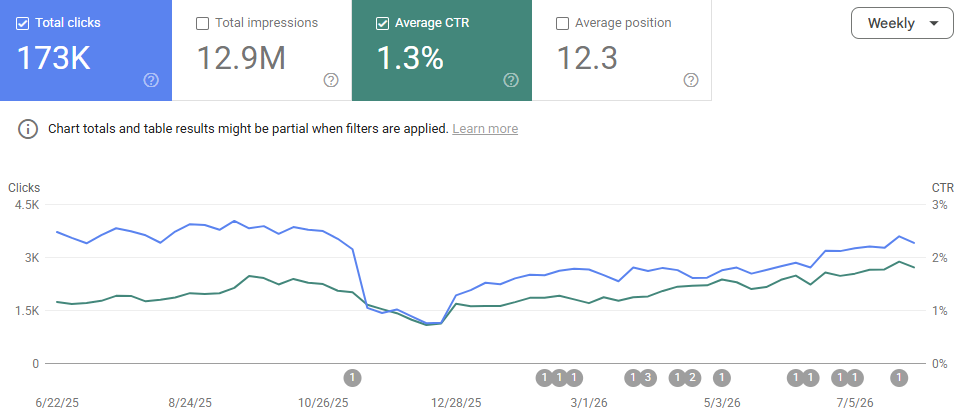
So take a full crawl of the Craft site well before launch, export Search Console whilst it still has sixteen months of history, and keep both. After launch, compare Search Console clicks rather than GA4, because tracking usually changes in the move. Compare like for like, the same weekdays before and after, set against the same weeks last year. And read the 404s daily for the first fortnight. They tell you exactly which redirects you missed.
A Craft-specific pre-launch checklist
On top of the generic ones in the mistakes article:
- Redirect map built from Search Console, a crawl and backlinks, not just the Retour export
- Retour slimmed to rules with evidence behind them, catch-alls dropped
- Rules sitting on live pages checked for loops before cutover
- Short URLs Craft handles in code tested and mapped, one row per pattern
- Old IDs or product codes stored against each product in Shopify
- Token URLs counted, and the Search Console sitemap checked
- Image URLs matched to their Shopify copies, and the old image host either connected or kept alive
- Article links rewritten to their final address after import
- Long articles checked against Sheets and Excel cell limits
- Related entries exported from the Craft database and rebuilt as metafields
- Hand-written titles found and protected
- A full crawl and a Search Console export of the Craft site saved before launch
How much does SEO support for a Craft to Shopify migration cost?
Full migration support from me starts at £2,500 + VAT, as a fixed fee covering the work above from planning through to the weeks after launch. A Craft site with a big article archive, a lot of code-level redirects or images on a separate host takes more than the minimum. You get a fixed quote before anything starts.
If your developer is doing the migration and you just want it checked over before launch, a pre-launch SEO check starts from £600 + VAT. I've worked on close to a hundred Shopify migrations, so the quote comes from knowing where the time actually goes. Here's how I work on Shopify migrations.
Questions I get asked
Can I keep my Craft URLs on Shopify? Not exactly. Shopify puts /products/, /collections/, /blogs/ or /pages/ in front of every page. You can keep the last part of the address the same, which makes the redirects simple and keeps the change easy to read.
Is there an app that migrates Craft to Shopify? Not for the parts that protect your traffic. Neither Shopify's Store Migration app nor Matrixify has a Craft route, and no tool knows about redirects that live in Craft's code. Expect a developer export, a scrape for the articles, and Matrixify to load it all.
Do I need Shopify Plus for all the redirects? No. A standard plan takes 100,000 redirects, which is plenty for most Craft sites even with a row for every short URL.
Should I keep Craft and connect Shopify instead? Sometimes. Craft has a free first-party Shopify plugin that pulls your products into Craft, with Shopify handling the checkout. If the content is the business and the shop is small, that can be the lower-risk route. If the shop is the business, moving fully usually is.
Will I lose rankings? Expect a wobble for a few weeks whilst Google swaps the old addresses for the new ones. What you shouldn't see is a lasting step down. If you do, it's nearly always redirects that are missing or pointing at the wrong page, and the 404 report is where to start.
If you run an ecommerce store and want more of this once a week, that's what Ecommerce Prioritised is for.

Written by
UK-based ecommerce SEO consultant, helping online shops with the technical SEO and content that drive organic growth.
Get the next one in your inbox
Ecommerce Prioritised is a free weekly read on growing an ecommerce store: what to prioritise, what to ignore, and the changes worth acting on.
Filed in Platform migrations
Share LinkedIn