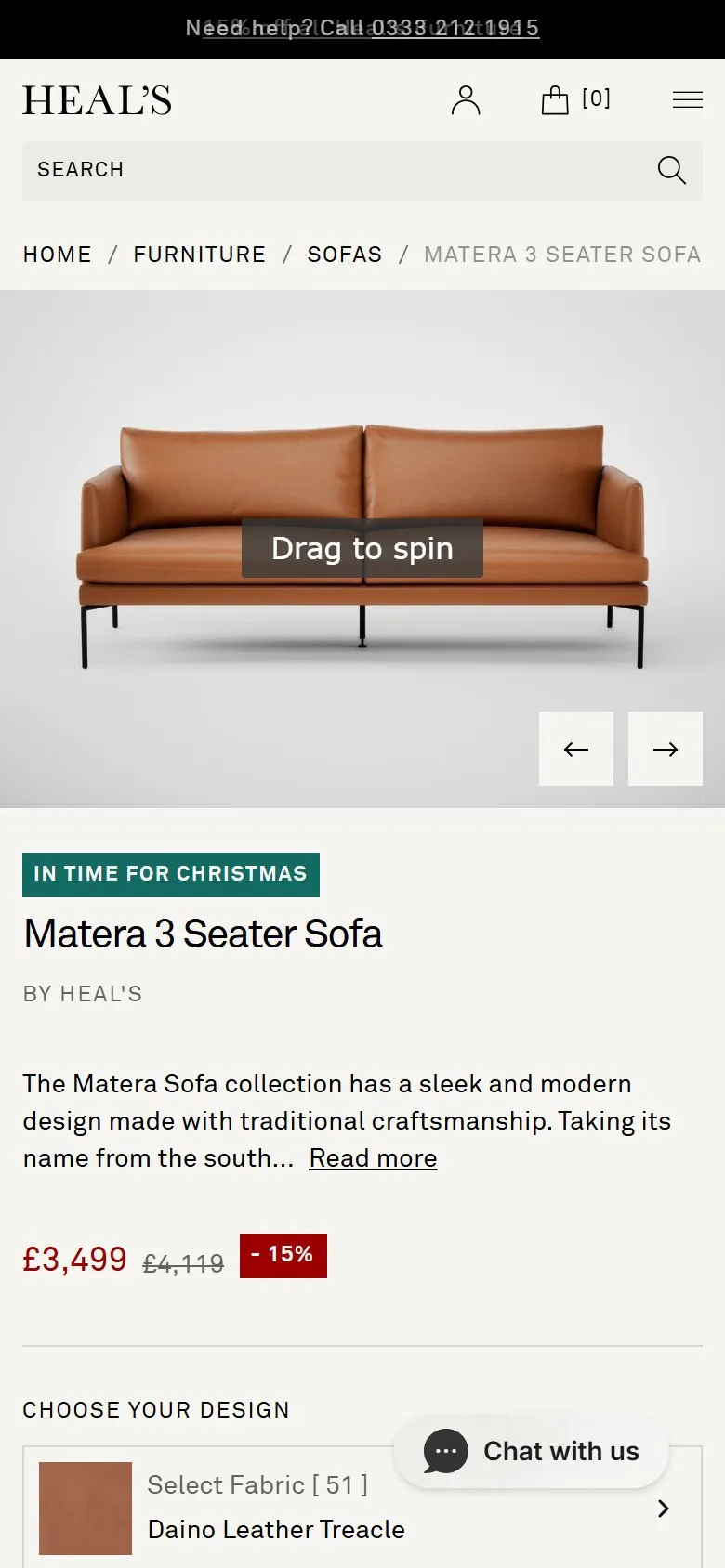
A 360 product view you can drag to spin, as the main image
What they do
The first frame of the gallery is a 3D render carrying a "Drag to spin" label. Drag it and the sofa turns, through the side, the back and the awkward three-quarter angle photography never covers. The renders follow the configuration rather than sitting apart from it: the product holds 104 media assets across 51 fabrics, and switching to Nobilis Velvet Neptune replaces the treacle leather with navy velvet at every angle. It runs on Fixtuur.
Why it works
At £3,399 to £4,119 the shopper is trying to picture the thing in a room they already own, and the questions that stall them are what the back looks like against a wall and how deep it really sits. A spin answers both in a gesture, and the answering is done by the shopper rather than by the brand, which is why it convinces. Rendering rather than shooting is what makes it affordable: 51 fabrics times a full rotation is a photography brief nobody would sign off, and a render set that regenerates per fabric costs the same whether the range has four colourways or sixty.
Makes sense when
High-consideration physical products where form matters and the configuration space is too big to photograph, which is most furniture and a fair amount of lighting and homeware. It needs proper 3D assets, so it's a platform decision rather than a template tweak. The obvious extension Heal's hasn't taken is augmented reality: the models exist, and a "view it in your room" button off the back of them is the shortest route from render to sale on a piece this size. Nothing on the page mentions AR at all.
More like this
More product patterns
Want this on your store?
I'll tell you which of these patterns will move organic revenue for your catalogue, and which to skip.
Book a discovery call