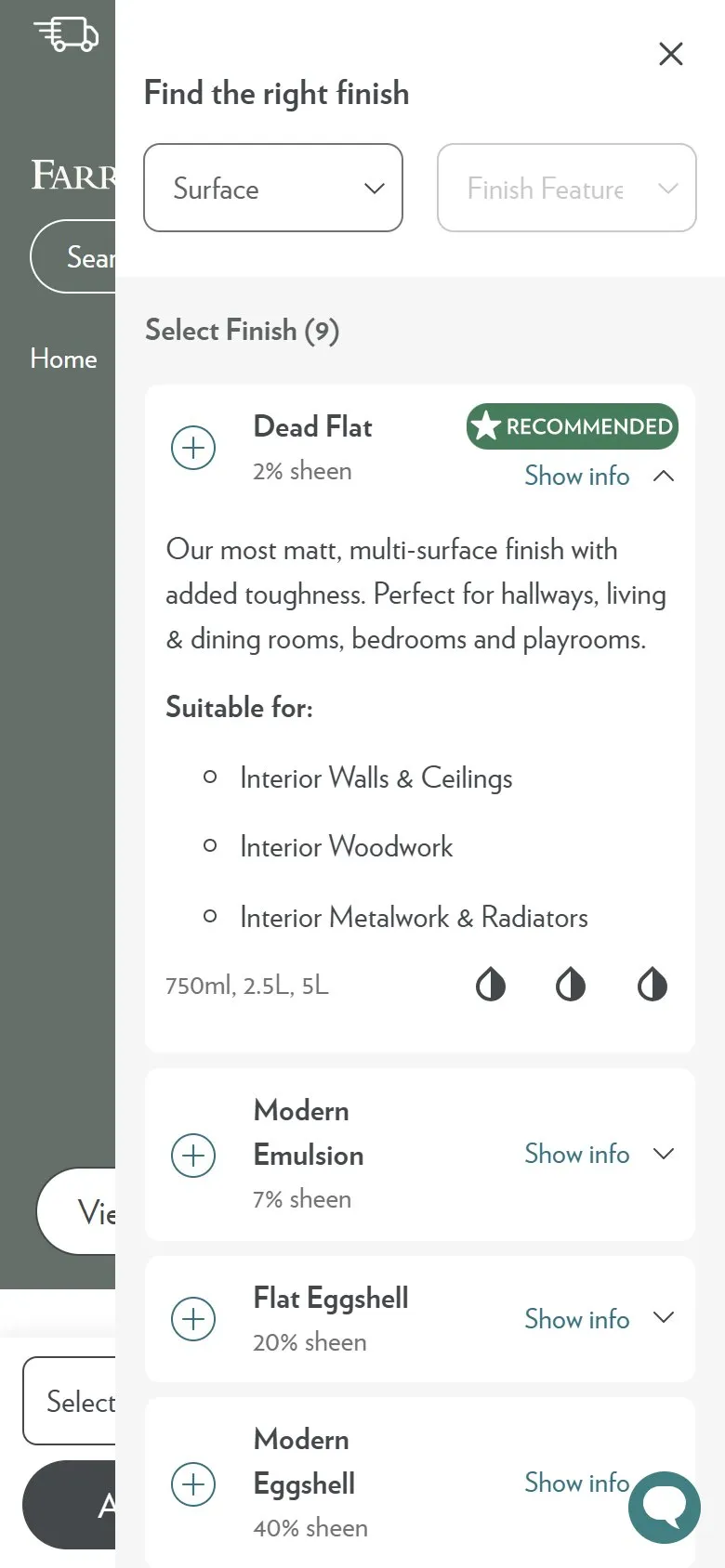
A finish selector that explains each option as you choose
What they do
Select Finish opens a drawer headed "Find the right finish" rather than a dropdown of names. Two filters sit at the top, Surface and Finish Features, and under them "Select Finish (9)" lists every option with its sheen level: Dead Flat at 2%, Modern Emulsion 7%, Estate Emulsion 2%, Flat Eggshell 20%, Modern Eggshell 40%, Full Gloss 95%, Exterior Eggshell 20%, Exterior Masonry 2% and Casein Distemper 2%. Each row expands into a plain-English description, a Suitable for list of surfaces, the tin sizes and coverage icons, and one option carries a Recommended badge, which for Douter on interior walls is Dead Flat.
Why it works
Finish is the step where a first-time buyer stalls, because the names are trade language and picking wrong means repainting a kitchen in something that won't scrub. Answering the question inside the basket flow, at the moment it's asked, beats sending people to a Help & Advice article they won't come back from. The filters let two different shoppers work the way they think: one knows the surface, the other knows they need something wipeable. The Recommended badge is the part that rescues anyone who still doesn't want to decide, which is most people, and a default beats an empty required field every time.
Makes sense when
A required option uses vocabulary the customer doesn't own, which covers finishes, fabric grades, tog ratings, material weights and sizing systems. Put the education inside the selector instead of linking away, give every option a one-line description in the customer's words, and mark a recommendation so the flow never depends on confidence the shopper doesn't have.
More like this
More product patterns
Want this on your store?
I'll tell you which of these patterns will move organic revenue for your catalogue, and which to skip.
Book a discovery call