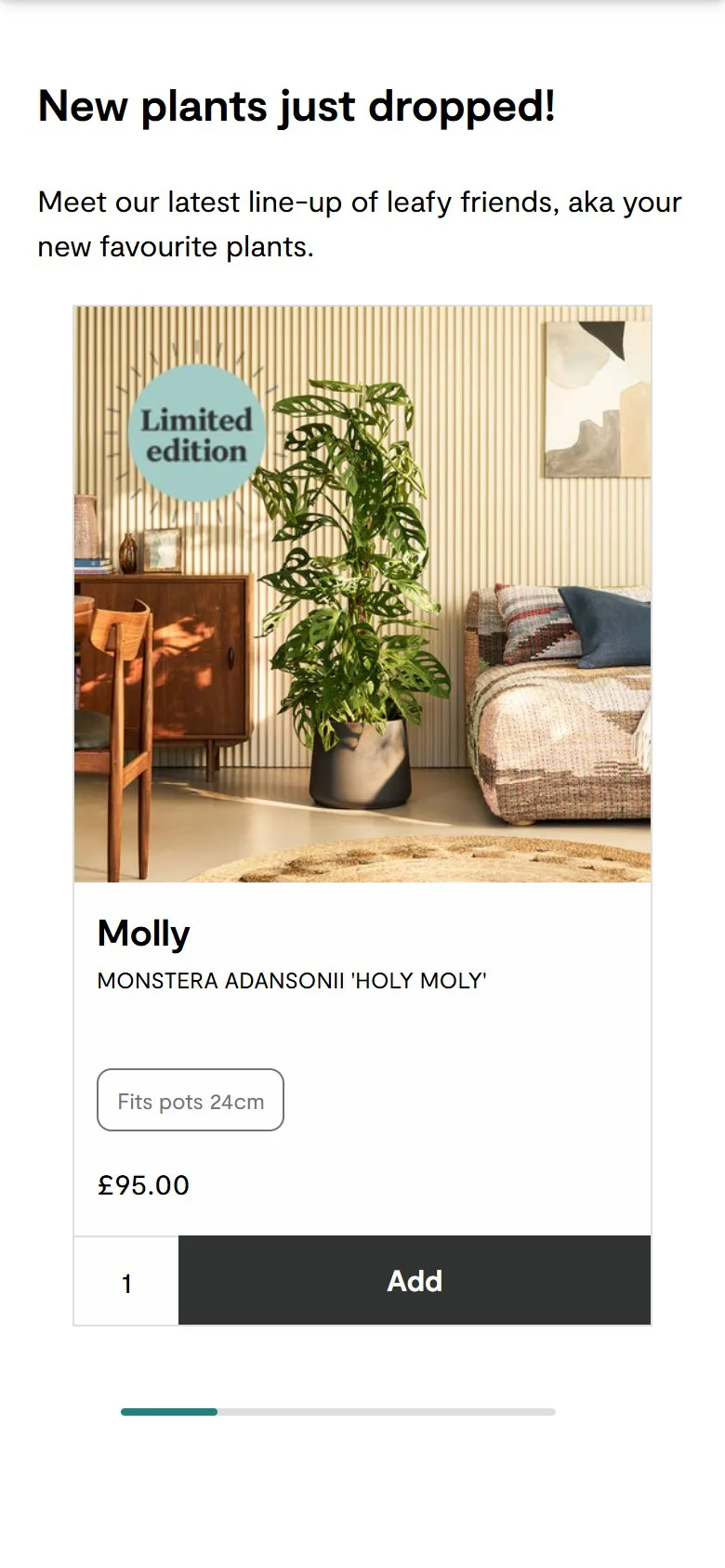
Product cards that tell you the pot size and add to bag from the grid
What they do
Every plant card in the "New plants just dropped!" carousel carries the plant's name, its proper name in capitals, a small tag like "Fits pots 24cm", the price, a quantity box and Add to bag. Molly, the Monstera adansonii 'Holy Moly', reads "Fits pots 24cm, £95.00". Plants that come in more than one size swap the button for "From £45.00" and See options rather than guessing a size for you. The "Patch's top 20" carousel underneath adds the height too: Susie the snake plant is "50-60cm, Fits pots 17cm". The same cards run through the collection pages.
Why it works
"Will it fit?" is the question every plant buyer has, whether they're matching a pot they already own or a spot on a shelf, and it's normally buried in a spec table on the product page. Here it's on the card. For a plant with one size, the card has everything needed to buy, so a repeat customer can fill a basket without opening a single product page. For a plant with several sizes, sending people to choose is the honest option, and the card says so.
Makes sense when
Products with one compatibility fact that decides the purchase: pot size, bulb fitting, bed width, filter model. Put that fact on the card in the shopper's own terms ("fits pots 24cm", not a nursery pot code). Only offer add to bag from the grid where there's genuinely nothing left to choose.
More like this
More homepage patterns
Want this on your store?
I'll tell you which of these patterns will move organic revenue for your catalogue, and which to skip.
Book a discovery call