I checked 669 UK Shopify stores. One collection page in seven was empty.
Empty collections, forgotten test pages and the other leftovers in established stores' sitemaps, scanned five weeks before Black Friday.
Jump to a section 9 sections
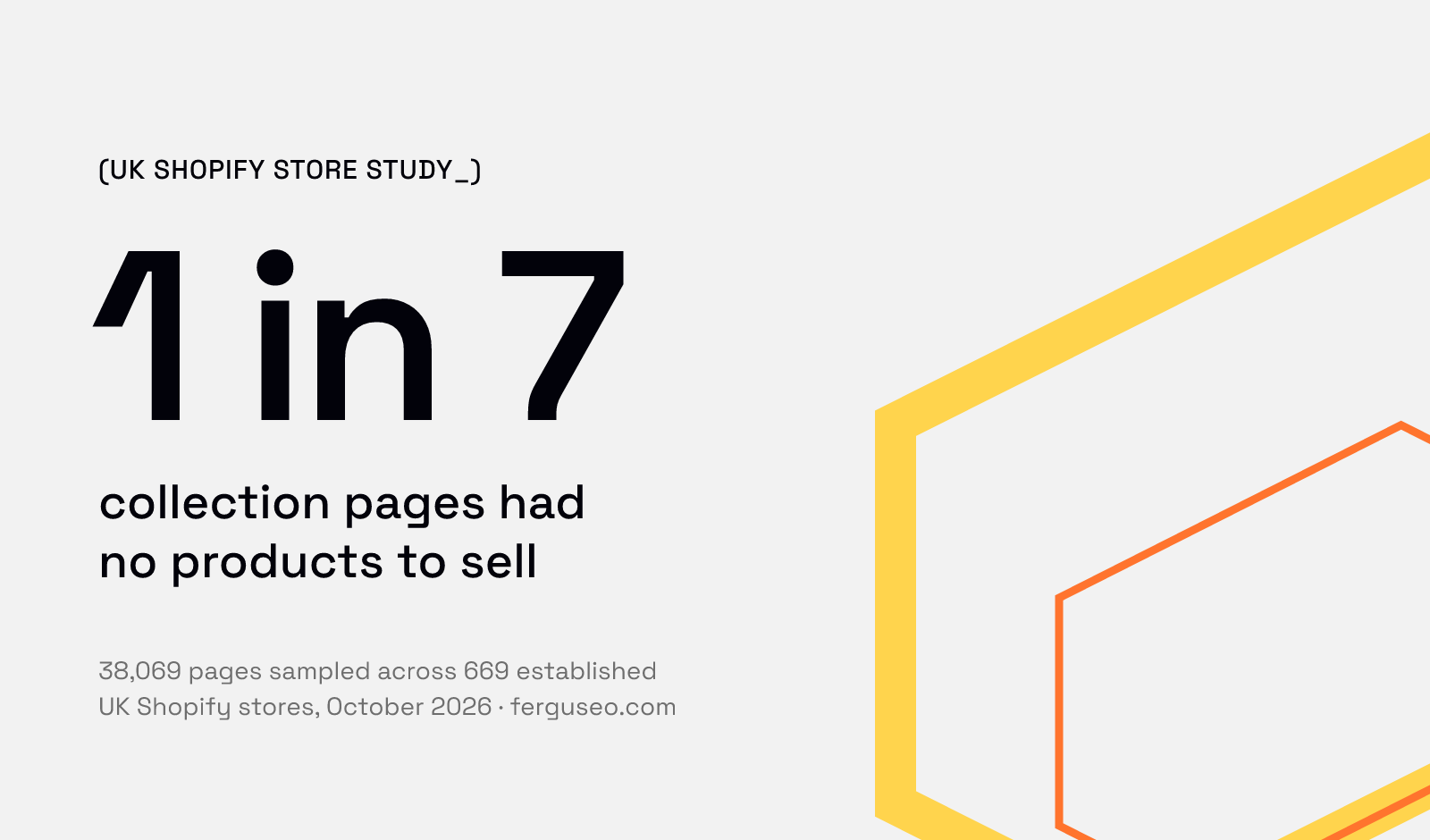
Five weeks before Black Friday, I scanned 669 established UK Shopify stores to see what was sitting in their sitemaps. About one collection page in seven had no products in it and nothing telling Google to leave it out, and nearly a third of the stores had a test or draft page still live. I wasn't measuring rankings, traffic or sales, just how common these leftovers are, whether my checks could be trusted, and what a store owner can do about them.
TL;DR. 13.3% of the collection pages I sampled had no products and no noindex tag, and 86% of stores had at least one. 30.2% of stores had a forgotten test or draft page in their sitemap. It's all easy to fix, and you can check your own store for free in a couple of minutes.
The research at a glance
- Stores
- 669 established, UK-facing Shopify stores, from published "best UK Shopify stores" lists and a directory ranked by estimated sales
- Scanned
- 20-21 October 2026
- Collection pages
- 38,069, sampled from 659 stores (up to 75 each)
- Sitemaps
- Every listed URL, on the 662 stores that had one
- Not measured
- Rankings, traffic or sales. No store is named.
How many Shopify collection pages are empty?
13.3% of the 38,069 collection pages I sampled had no products in them on the day, with no noindex tag and no canonical pointing elsewhere. The typical store had 8% of its collections empty, and 86% of the 659 stores I could check had at least one.
Empty here means no products in the collection at all. Sold-out products still count as something on the page.
Most weren't new. Of the 1,558 empty collections I could date in the first batch of stores, 86% had been published more than a year before the scan. That doesn't say when they emptied or why, only that most aren't brand-new collections waiting for their first stock.
Plenty more were close to empty. Counting the empty ones, 35.7% of collections had five products or fewer. A small range is a small range, so that's not a fault on its own, but it's worth knowing which of yours are thin.
Bigger catalogues had more empties. In the first batch, stores with over 500 collections had about one in five empty, against 11-15% for smaller ones.
Why does an empty collection page matter?
Because a shopper can land on one. If an empty collection is in your sitemap and nothing tells Google to leave it out, it can turn up in search, and whoever clicks through finds a page with nothing to buy.
Google's advice is short. Its ecommerce guidance says "If a category has no items, use a noindex robots meta tag", and suggests a 404 where the category has been removed for good. Almost none of the empty collections I found had either.
I didn't measure what empty collections do to rankings, so I won't put a number on it. But on that same page Google calls them pages "without useful content", and its guide to its ranking systems says that alongside judging each page, "Site-wide signals and classifiers are also used". So weak pages can count against the whole store, not just themselves. One empty collection won't sink a store. A lot of them, left in the sitemap for a year or more, is worth ruling out, and Google has said how.
How many Shopify stores have test pages live?
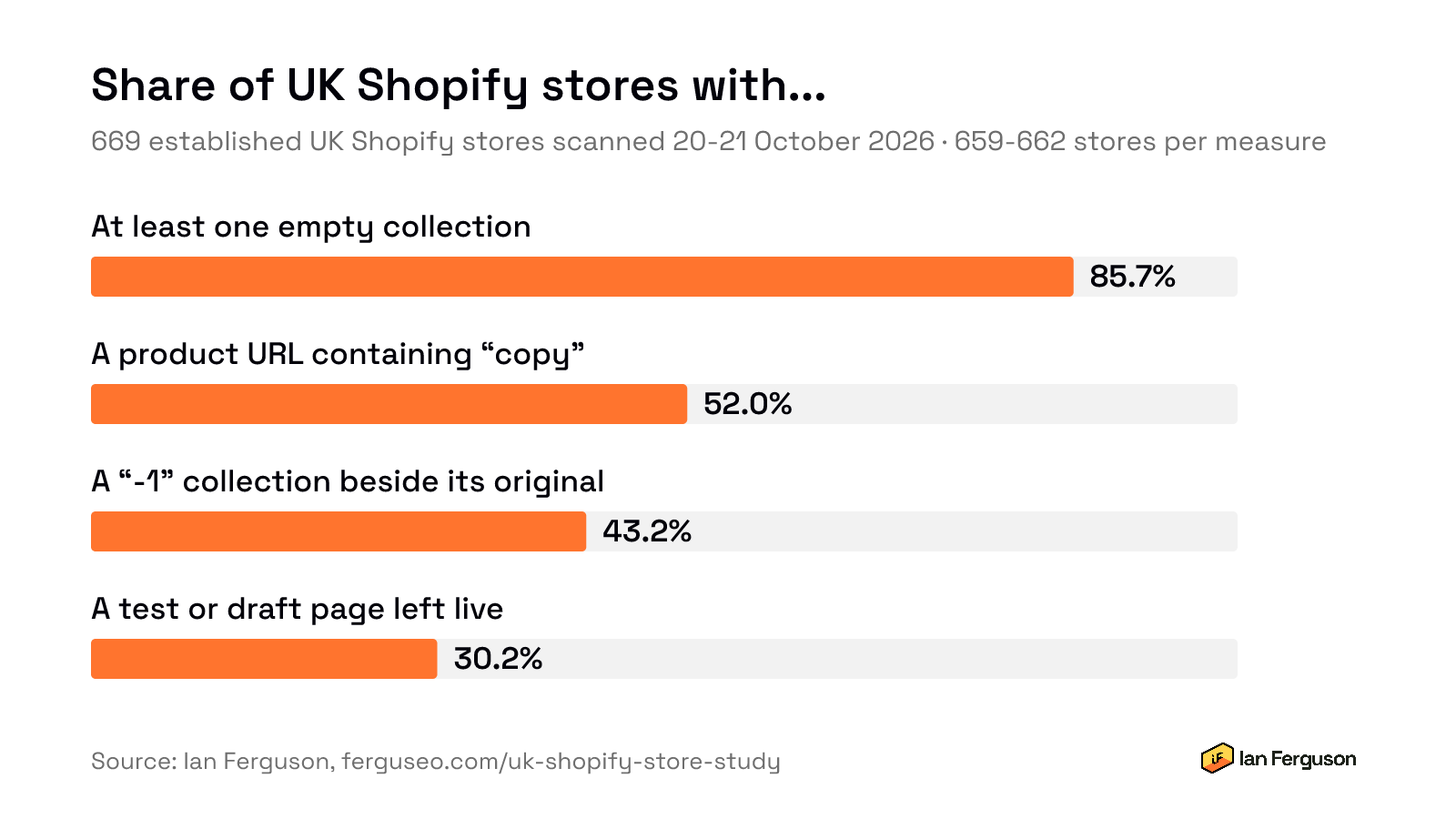
30.2% of the 662 stores with a sitemap had a page or collection that was made for testing or building and never taken down: a page called test, a newsletter test page, a collection named "test collection", an empty Father's Day test collection next to the real one.
I didn't count them off the word "test" alone. Plenty of real pages use it (exam prep, allergy tests, a magic trick called the book test), and "sample" and "demo" nearly always mean a sample sale or ex-demo stock. So every flagged page was opened and labelled by two AI labellers, on different models and working separately, and only pages both called a leftover count. I then checked 50 myself without seeing their answers, and agreed with 24 of the 25 leftovers among them.
The approach is deliberately cautious, and it may still miss leftovers the first rules didn't flag.
None of the confirmed leftovers was linked directly from its store's homepage. They sit in the sitemap, the list of pages a store hands to Google, and more than half of them were empty or close to it.
What else turned up?
"-1" collections. 43.2% of stores had a collection ending in "-1" live alongside the original. Shopify adds "-1" to a web address when the one it would have made is already taken, which usually means a name was reused. I compared the products in 60 of these pairs: 14 showed exactly the same products twice, and most of the rest were a reused name with different products, or had one side empty.
"Copy" in product URLs. 52.0% of stores had a product whose web address contains "copy", left over from duplicating a product in the admin. Of the 40 I checked, only one still shared its name with a live original, so this is a naming habit rather than a duplicate content problem.
Missing meta descriptions. 31.0% of collections had none, and nearly all of those had no collection description either. Google writes its own snippet when there isn't one, so it's a missed chance to say what the page is for rather than a fault.
Were the stores from "best of" lists any different?
Not in any way I could measure. In the first batch, the 78 stores taken from published "best UK Shopify stores" lists had 12% of their collections empty, against 15% for the directory stores, and every other measure was within a few points. Being picked out as a good store didn't go with a tidier catalogue.
So even established stores pick these up. It's not just a small-shop problem.
How do I check my own store?
1. Empty and thin collections. Run your store through the Low-Quality Category Page Checker. It checks up to 500 collections and lists the ones with no products or only a few, and the ones missing a meta description.
2. Test pages and other leftovers. Run it through the Dated Content Checker. It reads your sitemap and flags addresses that look like test or draft pages, "-1" and "copy" leftovers, and old years. It goes on the address, not what's on the page, so treat it as a shortlist to check by hand.
Then, for each one that turns out to be real:
- A test page or draft collection: delete it, or hide it from your online store in the Shopify admin.
- An empty collection that's coming back (seasonal stock, a pre-order): keep it if shoppers look for it, say when stock returns, and think about keeping it out of search until it does.
- An empty collection that's gone for good: redirect it to a genuinely close replacement if there is one. If there isn't, delete it and let the old address return a 404.
- A "-1" pair showing the same products: keep one and redirect the other to it.
If you've a lot of collections that empty and refill, ask your developer about adding the noindex tag Google suggests automatically whilst a collection is empty, and make sure they test that it comes off again when products return.
Questions I got asked
Which stores were they? I'm not saying. These leftovers turned up right across the sample, and naming stores would only embarrass people for something this common.
Is this every UK Shopify store? No. There are over 200,000 of those. This is 669 established ones, so don't read the figures as an average for all of them.
What do you mean by established? It's shorthand for how the stores were chosen: featured in a published best-of list, or ranked in a directory by estimated sales. I didn't check how long each one had been trading.
Will you run it again? Yes, on the same stores in February 2027, to see what's changed after the busiest few months of the year.
For journalists and researchers
You're welcome to quote the figures and use both graphics, with "669 UK Shopify stores, October 2026" and a credit to this page. The headline graphic and the store findings chart are full-size PNGs. If you want a figure cut a different way, or the method explained, email [email protected]. Results for individual stores aren't published and won't be.
How the study worked
The question
Across established UK Shopify stores, how common are empty and thin collection pages, missing collection descriptions, and leftover pages in the sitemap? I wrote that down before collecting anything. It's a descriptive question: it counts what's there, and doesn't try to say what any of it does to traffic or rankings.
Which stores
There's no free, random list of UK Shopify stores, so the sample comes from two public sources: nine published "best UK Shopify stores" lists from agencies, app makers and data companies, plus nine stores featured on this site; and AfterShip's public UK ecommerce directory, which ranks roughly the top 10,000 UK online shops by estimated sales. From the directory I took stores marked as Shopify from evenly spaced pages, drawn at random across five bands of the ranking.
A store was kept if its homepage loaded, it ran on Shopify, and it was UK-facing (prices in pounds, or a .uk domain where no currency showed). My own clients were taken out before anything was drawn. I scanned 340 stores, tightened the rules, then froze them and scanned 329 stores they'd never seen.
| Stage | Batch 1 | Batch 2 |
|---|---|---|
| Candidates | 431 (131 from lists, 300 from the directory) | 385 (directory) |
| Not on Shopify | 28 | 19 |
| Not UK-facing | 24 | 16 |
| Blocked the scanner, unreachable or erroring | 35 | 21 |
| In both sources | 4 | 0 |
| Scanned | 340 | 329 |
What was measured
I used the engines behind my two free tools, unchanged, driven by batch scripts. Only public pages were read.
- Collections. Each store's collections were found from its sitemap. Up to 75 per store were drawn at random from the first 500 listed, and for each one I fetched the page and Shopify's own product list for that collection. 356 of the 38,425 sampled (0.9%) didn't load and were left out of both sides of every rate, leaving 38,069 across 659 stores.
- Empty means Shopify's product list for the collection returned no products. Sold-out products still count.
- The headline 13.3% counts empty collections with no noindex tag and no canonical pointing to another page. robots.txt was read separately on all 659 stores, as a crawl check rather than an indexing one, and didn't block any analysed collection. X-Robots-Tag headers were checked on a sample of 8,740 pages and none carried one. Directives added by JavaScript weren't checked.
- No meta description means no description tag, or one under ten characters.
- Collection age comes from the publish date Shopify reports for each collection, read for 1,558 empty collections in the first batch. A collection taken offline and put back gets a new date, so it's when a collection was last published, not necessarily when it was created.
- Sitemap leftovers. Every URL in each store's sitemap (662 stores had one) was checked against the tool's rules for test and draft pages, "-1" addresses and "copy" addresses. Shopify Markets stores list every page once per country, so those copies were collapsed before counting.
How the test pages were labelled
A word match on its own overstates badly, so the rules only flag and the labels decide.
- I wrote the labelling rules (leftover, legitimate, gone or unclear) before opening any flagged page.
- All 550 flagged pages and collections that loaded were labelled, a full census rather than a sample.
- Two AI labellers on different models labelled them separately, the second working blind with only the rules and the page evidence. They agreed on leftover or not 99.4% of the time in the first batch and 94.8% in the second. Only pages both called a leftover count towards the 30.2%.
- I then labelled 50 myself without seeing either set of answers: 25 drawn at random from the agreed leftovers, 20 from the legitimate pages and 5 from the disputed or unclear ones, shuffled. I agreed with 24 of the 25 leftovers. Across all 50 I agreed with the first labeller 88% of the time (kappa 0.76), and I called five more leftovers than it did, mostly test copies of real pages that the rules count as legitimate. Because the 50 were picked from each group rather than at random overall, the 88% describes this set, not the whole census.
The checks on my own numbers
- Are empty collections really empty? I re-fetched 60 empty and 60 full collections, one per store. All 120 product counts matched. 58 of the 60 empties showed an empty grid on the page. The other two were a custom template with no product grid and a page I couldn't classify, so at most 2 of 60 could be mislabelled. I haven't adjusted the headline for them.
- Do search apps fill the grid in later? The same 60 empties were loaded in a real browser with JavaScript running, 23 of them using search or merchandising apps. Only those same two pages showed a product grid, because the apps read the same product list Shopify does.
- Do SEO apps add the meta description later? 40 collections without one were loaded the same way. None gained one.
- Does sitemap order bias the large stores? Shopify lists collections oldest first, so on the 64 stores with more than 500 collections, a sample from the first 500 only covers the oldest. For each of those stores I drew 20 more collections at random from beyond the first 500 and combined the two parts, weighted by how many collections sit in each. That moved the headline from 13.5% to 13.3%.
- Do the rules work on stores they weren't tuned on? The second batch of 329 stores was scanned with the rules frozen. Every figure came out close, and slightly cleaner if anything.
The results
| Measure | Base | All 669 | 95% interval | Batch 1 | Batch 2 |
|---|---|---|---|---|---|
| Collections empty, no noindex or canonical elsewhere | 38,069 collections | 13.3% | 12.1-14.6% | 14.0% | 12.6% |
| Collections with 0-5 products | 38,069 collections | 35.7% | 34.0-37.4% | 35.3% | 36.2% |
| Collections with no meta description | 38,069 collections | 31.0% | 28.6-33.6% | 32.5% | 29.5% |
| Stores with at least one empty collection | 659 stores | 85.7% | 82.9-88.2% | 86.8% | 84.6% |
| Stores with a test or draft page both labellers called a leftover | 662 stores | 30.2% | 26.8-33.8% | 33.3% | 27.0% |
| Stores with a "-1" collection beside its original | 662 stores | 43.2% | 39.5-47.0% | 44.9% | 41.4% |
| Stores with a product URL containing "copy" | 662 stores | 52.0% | 48.2-55.7% | 50.6% | 53.4% |
Collection rates have intervals bootstrapped by store; store shares have Wilson intervals. The empty-collection rate is corrected for sitemap order.
What I'd treat with caution
- The intervals cover sampling, nothing else. They don't account for how the stores were chosen or for labelling mistakes, so they aren't a margin of error for all UK Shopify stores.
- One moment in time. Stock moves. A collection empty on 20 October may have been full a week later, and the reverse.
- "Established" describes how stores were picked, not a check of how long they've traded. New and small shops are under-represented, and they may well have more leftovers, not fewer.
- Misses aren't measured. I checked how often a flag was right, not how many leftovers the rules didn't flag at all.
- No effect on traffic is claimed. Nothing here measures rankings, traffic or sales.
- Some stores turned the scanner away. 14 stores from the published lists blocked it, including some of the biggest names, so they're missing.
- The first batch's directory sample had a gap. The first parser read only about half the stores on each directory page. The second batch used a corrected one and read every store, and its figures came out close.
- Pacing, not robots.txt. The scanner fetched one page at a time per store with a pause between requests, but didn't read each store's robots.txt before fetching. The re-scan will.
If you run an ecommerce store and want more of this once a week, that's what Ecommerce Prioritised is for.

Written by
UK-based ecommerce SEO consultant, helping online shops with the technical SEO and content that drive organic growth.
Get the next one in your inbox
Ecommerce Prioritised is a free weekly read on growing an ecommerce store: what to prioritise, what to ignore, and the changes worth acting on.
Filed in Technical SEO
Share LinkedIn